


Subscription Stopper & Manager
3.92.13K Reviews
App Specs
- Version
- 2.0.8
- Updated On
- License
- Free
- Downloads
- 100,000+
- Developer
- InMarket Media, LLC
- Categories
- Finance
- Platform
- Android
Screenshots
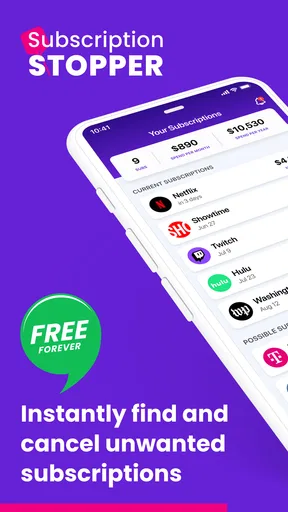
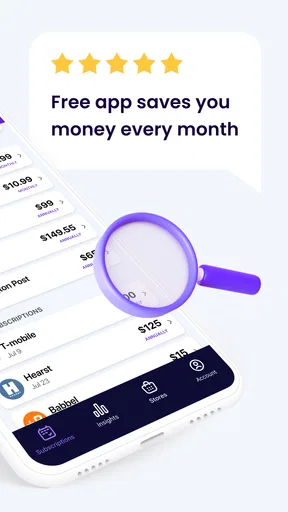
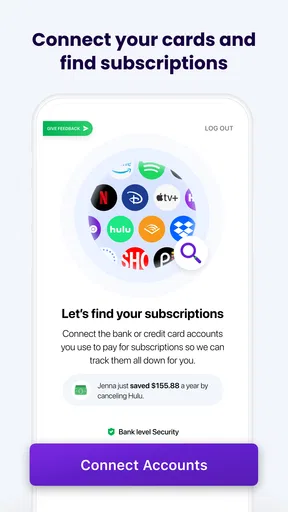
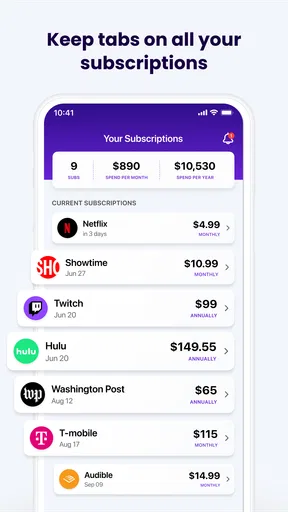
 Analysis by AppCompare
I tend to notice subscription spending only when several renewals land close together. A music service here, a streaming plan there, and a forgotten trial can make the monthly total feel larger than it did when I signed up. That is the problem Subscription Stopper & Manager is built to help me see: recurring payments are easy to start and easy to lose track of, so I need a clear way to review them before they renew.
What makes the app useful is not simply listing expenses; it is bringing renewal timing and cancellation decisions into the same routine. Instead of relying on memory or searching through old emails when a charge appears, I can use a subscription-focused tool to make a deliberate choice: keep the service, reconsider it, or follow the steps to cancel. That focus is especially handy when small recurring charges have become part of the background noise of everyday spending.
A finance app focused on recurring commitments
Subscription management sits between budgeting and bill tracking. A general budget app can show that money is going out, but a subscription manager puts the recurring services themselves at the center. I find that distinction useful: it prompts me to ask whether I still want each commitment, rather than only whether I can afford the total. For anyone trying to trim monthly spending, that question can be more actionable than a broad chart of expenses.
The app is a free finance app from InMarket Media, LLC, with a 4.0 average from around 3,600 ratings and more than 100,000 installs. It is rated for everyone, and its current version is 2.0.8. Those details make it easy to identify, but they do not replace the practical question: will a dedicated place for subscription decisions fit the way I handle money? I think it can, provided the user is willing to review what it shows and act on the reminders.
Why renewal awareness matters
A renewal reminder is most valuable when it arrives early enough to leave me with a real choice. If I see a prompt before a service renews, I can decide whether I have used it recently, whether I expect to need it in the coming month, and whether cancellation is worth the effort. That is a better moment to make the decision than after a charge has already posted, when I may be annoyed but still unsure what I agreed to.
I would use the reminder as a checkpoint, not as a guarantee that a payment will be prevented. Notifications can be missed, and the final cancellation step may still belong to the service provider. A sensible habit is to review an upcoming renewal as soon as the alert appears, then confirm the cancellation with the provider if I choose to stop. That small follow-through matters more than treating any tracker as an automatic shield against charges.
Making a cancellation decision without rushing
The cancellation assistant is useful because it gives the decision some structure. When I am ready to leave a service, guidance through the cancellation process can make the task feel less daunting, particularly if the provider presents extra prompts or retention offers. I would still read each screen carefully and make sure the account itself confirms the change; advice can help me navigate, but I should not assume that opening a guide has completed a cancellation.
Worth Reading Before You Choose

EA SPORTS FC Mobile 26 Is a Bigger Football Game, but It Takes Time

Flipboard Shows What News Apps Must Do Beyond the Feed

Switching to Android Auto Means Rethinking Your Driving Routine

Google Calendar Makes a Crowded Week Easier to Manage

Ludo King Makes the Most of the Minutes Between Plans

Baby Panda World Brings Quick Play to Modern Phones, but Its Game Library Feels Busy
There is also a practical trade-off here. Some people prefer to cancel immediately whenever they spot an unused service, while others want to check whether a plan is shared with family, tied to a bundle, or needed for an upcoming project. The app’s role is to make the recurring commitment visible and help with the next step. The final call remains personal, and taking a moment to check the consequences can prevent cancelling something another person in the household relies on.
Putting subscription tracking to work
The best routine is a short review at a time I already look at my finances. I can check what is coming up, compare it with my plans for the next few weeks, and decide which services still earn their place. This is more manageable than trying to reconstruct a year of spending all at once. If a subscription is seasonal, for example, I might keep it through a month when I expect to use it and set a later reminder to reconsider, rather than cancelling impulsively and signing up again soon after.
For a realistic example, imagine I am planning a tighter month after several annual and monthly commitments have accumulated. I open the tracker before payday, look at the categories and upcoming renewals, and notice a service I have not used lately. Rather than making a vague promise to cancel it someday, I use the cancellation guidance while I have the account details to hand, then check with the provider that the plan has ended. I can also decide whether a different subscription deserves priority. The value is not a dramatic trick; it is turning an overlooked payment into a specific decision.
Where the overview helps—and where it needs judgment
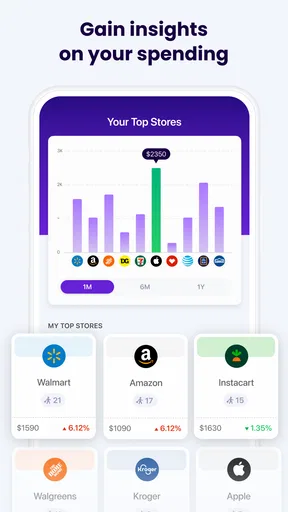
Seeing expenses grouped by category can help me find patterns that are hard to notice one charge at a time. If entertainment services take more of the monthly budget than I expected, I can review those commitments together instead of singling out whichever payment appeared most recently. The budget tool adds another useful prompt: setting a limit for subscription spending gives me a reference point when I consider adding something new.
Still, a category total does not tell me whether a service is worthwhile. A higher entertainment budget might be a deliberate choice for a household that shares several services, while a small charge may be wasteful if nobody uses it. I would treat the app’s spending view as a starting point for judgment, not a verdict on what I should cancel. The strongest workflow is to combine the numbers with a quick check of actual use and the next renewal date.
How it compares with the usual alternatives
I see this as a more focused companion to a spreadsheet, banking app, or full budget planner. A spreadsheet gives me complete control and can be tailored to unusual billing arrangements, but I have to enter and maintain everything myself. A banking app can help me spot transactions, yet a list of charges may not make it obvious which ones recur or what action to take. A broad budgeting tool can put subscriptions into a larger financial picture, though that wider scope may be more than I need when my main concern is renewals and cancellation decisions.
This app makes more sense when I want the subscription task to stay visible and separate from the rest of my budget. It is less compelling if I already maintain an accurate recurring-payment list and reliably check provider accounts before renewal. I would also choose a conventional bank or budgeting app as my main tool if I needed a complete view of income, debts, and everyday purchases; subscription management is a narrower job, not a replacement for overall financial planning.
Small habits that make the tool more useful
One useful habit is to review a service when its renewal prompt arrives rather than postponing the choice. I can ask myself three concrete questions: have I used it since the last payment, do I expect to use it before the next one, and is there a less costly way to meet the same need? That quick test reduces the chance that I keep a service simply because cancellation feels like a chore.
Another good practice is to separate “not using it now” from “never need it again.” A subscription used for a particular season or project may be worth pausing or cancelling temporarily, while a household service could be shared or relied on by someone else. Before acting, I would check who uses the account and whether stopping it affects a bundle or other access. This extra minute of checking is a worthwhile trade-off against an avoidable re-subscription or disruption.
I would also treat the budget limit as a planning aid rather than an automatic stop sign. If I am close to the limit, that is a cue to compare a new service with what I already pay for, not proof that the new service is a bad choice. Conversely, being under the limit does not make every subscription useful. Combining the budget view with renewal reminders and a real check of usage is what gives the app its practical value.
What to expect before relying on it
The app is free to download, with in-app purchases listed from $5.99 to $99.00 per item. I would check the purchase details shown in the app before committing to anything paid, especially if I only need a basic review of recurring charges. That keeps the decision grounded in my own use: first see whether the workflow helps me, then decide whether any optional purchase is worthwhile.
It runs on devices with Android 7.0 or later. That makes the minimum requirement straightforward to check before installing, but it is still worth confirming that the device I plan to use meets it. The everyone age rating also makes the app broadly suitable from a content perspective; it does not change the fact that financial decisions should be made carefully, particularly when subscriptions are shared or connected to another account holder.
One question I would keep in mind is whether a reminder alone is enough for my habits. If I routinely ignore notifications, I should pair the app with a regular calendar or money review rather than expect an alert to solve the problem by itself. Another is whether I need help cancelling a service or merely want a record of its cost. The cancellation guidance is the stronger fit for the former; someone who only needs a simple list may find a notes app or spreadsheet adequate and more flexible.
Who gets the most from it
I would recommend this kind of focused tool to someone who has several recurring services, has forgotten a renewal before, or wants a nudge to check whether subscriptions still match current priorities. It can also help someone who is trying to reduce discretionary spending without tracking every purchase in detail: reviewing recurring commitments is a contained task, and each decision can have a clear outcome.
It is not the right choice for everyone. If I have only one or two subscriptions and already know their renewal dates, a dedicated manager may add another place to check without saving much effort. If I need detailed household accounting or a complete budget, a broader finance app or a carefully maintained spreadsheet is likely the better foundation. And if I expect a tool to cancel every service automatically without my involvement, I should adjust that expectation: the useful part is guided attention and decision support, followed by checking the provider account.
My experience with the everyday workflow
When I first downloaded Subscription Stopper & Manager, I was a bit skeptical. I've tried similar apps before, but they were either too complicated or didn't deliver on their promises. But this app? It’s different. The setup was a breeze, and within minutes, I had it up and running. The interface is clean and straightforward, which is a breath of fresh air in the cluttered world of finance apps.
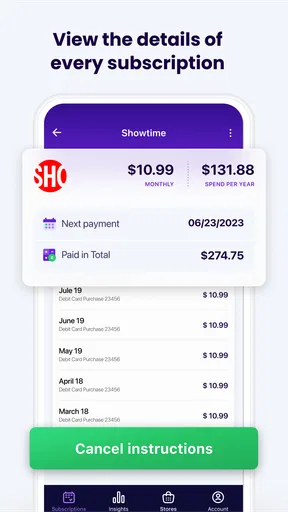
The initial scan of my subscriptions was eye-opening, to say the least. It pulled in everything from my Netflix account to that obscure magazine I subscribed to last year and completely forgot about. The app categorizes each subscription, making it easy to see where your money is going and how much you’re spending monthly.
Reminders and the cancellation path
One feature I particularly love is the notification system. It gives you a heads-up before a subscription renews, which is perfect for someone like me who tends to forget these things. No more unexpected charges! Plus, the app sends reminders to evaluate whether you’re still using or needing a particular service. It’s like having a finance-savvy friend who keeps you in check.
Another useful feature is the cancellation assistant. If you decide that a subscription isn’t worth it anymore, the app guides you through the cancellation process. It even provides tips on how to avoid those pesky "are you sure you want to cancel?" traps that some services like to spring on you.
Reading the spending picture
The insights feature offers a deeper understanding of your spending habits. It breaks down expenses by category, allowing you to see how much you’re shelling out on entertainment, productivity tools, and other services. This kind of transparency is invaluable when you're trying to tighten your budget.
Also noteworthy is the budgeting tool. It helps you set monthly spending limits on subscriptions, which is a fantastic way to ensure you don’t go overboard. I’ve found it to be incredibly helpful in maintaining some semblance of financial discipline.
Privacy deserves a careful look
In today’s digital age, security is paramount, and the app takes this very seriously. The app uses bank-level security to protect your data, which gave me peace of mind. It never shares your information with third parties, so you can manage your finances without worrying about privacy breaches.
My recommendation
All in all, Subscription Stopper & Manager has been a fantastic addition to my financial toolkit. It's intuitive, user-friendly, and genuinely helpful in managing and optimizing my subscription spending. Whether you're looking to cut down on unnecessary expenses or simply want a clearer view of your monthly outgoings, this app is worth checking out.
So, if you’re ready to take control of your subscriptions and finally answer that nagging question of "where did my money go?", give this app a whirl. Who knows, it might just save you more than a few dollars.
Pros
- Easy to navigate interface.
- Tracks multiple subscriptions efficiently.
- Customizable notifications.
- Secure data protection.
- Works offline seamlessly.
Cons
- Limited free features.
- No integration with bank accounts.
- Occasional sync issues.
- Ads in free version.
- Limited customer support hours.
FAQs for Subscription Stopper & Manager
What is Subscription Stopper & Manager and how does it work?
Subscription Stopper & Manager is an app designed to help users manage their various subscriptions effectively. It allows you to track all your active subscriptions, receive reminders about upcoming payments, and even cancel subscriptions directly through the app. This tool aims to prevent unwanted charges and optimize your spending.
Is Subscription Stopper & Manager available for both Android and iOS?
Yes, Subscription Stopper & Manager is available for download on both Android and iOS platforms. Users can find it on the Google Play Store and the Apple App Store, ensuring accessibility for a wide range of smartphone users. Always ensure your device meets the app's system requirements for optimal performance.
Does Subscription Stopper & Manager require a paid subscription to use?
Subscription Stopper & Manager offers both free and premium versions. The free version provides basic tracking features, while the premium version includes advanced tools like automatic cancellation and custom alerts. Users can choose the plan that best fits their needs, with clear details provided within the app.
How secure is my data with Subscription Stopper & Manager?
The app prioritizes user privacy and data security. It employs encryption protocols to safeguard your information and does not share your data with third parties without consent. Regular updates ensure compliance with the latest security standards, giving users peace of mind while managing their subscriptions.
Can Subscription Stopper & Manager handle international subscriptions?
Yes, the app is designed to manage both local and international subscriptions. It supports multiple currencies and adapts to different billing cycles, making it suitable for users with diverse subscription needs. This flexibility ensures users can track and manage all their subscriptions efficiently, regardless of origin.


